Nick Saraev's video, with 316 thousand views, promises that Claude Code can now run completely free with almost unlimited usage. It is about FreeLLMAPI, an open-source GitHub project with 28 thousand stars.
Every claim from the video was checked against the project's source code, documentation and model catalog as of 24 September 2026. The tool is real and does the main thing. In three places the video exaggerates; this is covered below. The guide follows the official documentation; we did not run our own speed or quality benchmark.
FreeLLMAPI does not turn free models into Claude, but it removes the main pain: work does not stop when the limit runs out. Install the app, add three to five free keys, and keep one command, npx freellmapi launch, for the moment your subscription hits its limit.
What FreeLLMAPI gives you
Claude Code runs on a Pro or Max subscription or through the API. Every plan has a five-hour window limit and a weekly limit, even Max at 100 dollars a month. When the limit is reached, work stops.
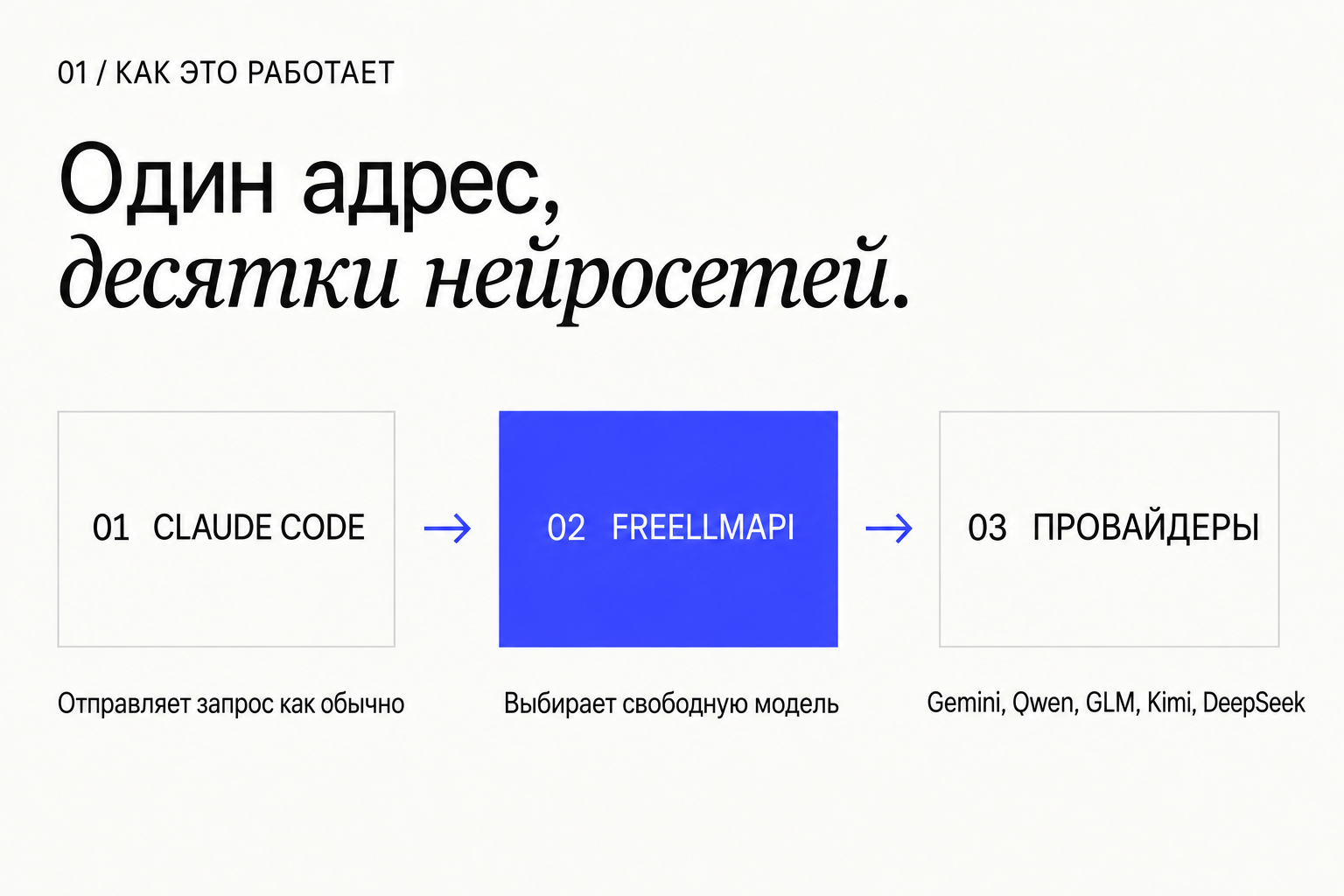
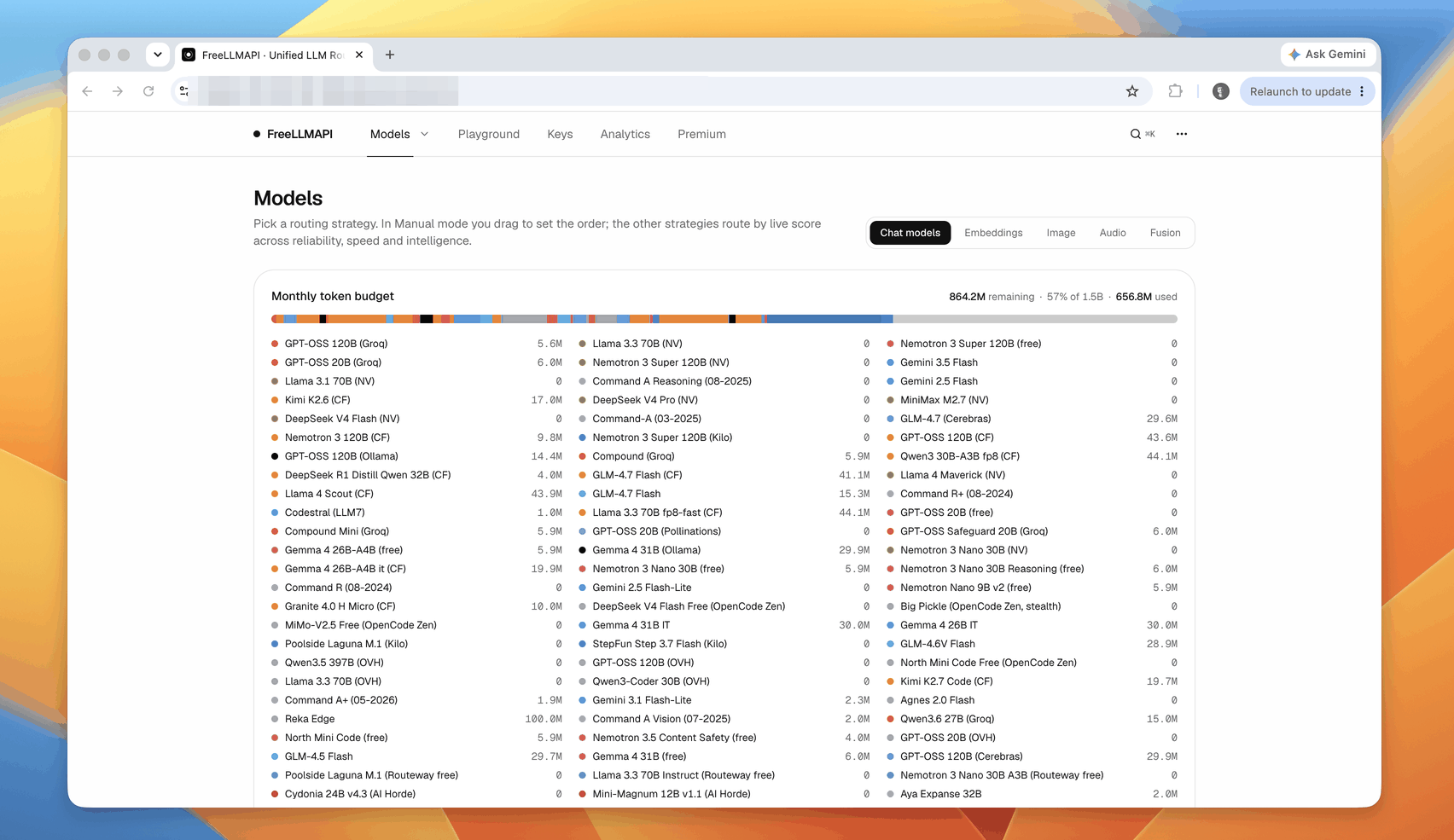
FreeLLMAPI is a free open-source router under the MIT license. Its author is Tashfeen Ahmed; his GitHub profile lists Microsoft and Dublin. The router gathers the free tiers of 34 providers into one address on your computer: Google, Groq, Cerebras, OpenRouter, Mistral, NVIDIA, Cloudflare, Cohere, Z.ai, Hugging Face and others. According to the project catalog, that is 635 free model endpoints and about 7.4 billion tokens a month.
Claude Code connects to this address directly: the server speaks the same protocol as the Anthropic API. Every Claude Code request goes to whichever free model the router picks. When a model runs out of quota or fails, the router takes the next one in the chain.
- Claude Code works without a subscription or after its limit
- The router switches to the next model by itself when the current one runs out
- Provider keys are stored encrypted on your own computer
Every claim, checked
The core of the video is right: Claude Code can really run for free through FreeLLMAPI. But three claims are stronger than the reality.
- “Completely free”: true. The router is free, the models are on providers' free tiers. The only paid part is an optional same-day catalog feed: 19 dollars a year or 49 dollars once.
- “Over 7 billion tokens a month”: true with a caveat. About 7.4 billion adds up only if you add keys for every provider.
- “Over 600 models”: true, 635 free endpoints.
- “Models from ChatGPT, Gemini, GLM, Kimi, Grok, Mistral, Qwen”: Gemini, GLM, Kimi, Mistral and Qwen are there. From OpenAI the catalog has only the open GPT-OSS models, and Grok is not in the catalog.
- “One easy setup”: half true. Claude Code connects with one command, but you have to get a key from each provider separately.
- “When your Claude limit runs out, it switches to the next model”: inaccurate. The router does not use your Claude subscription. It switches free models among themselves. To keep going for free after your subscription limit, you start Claude Code through FreeLLMAPI with a separate command, see step 5.
- “It leaves a note for the new model”: the feature exists but is off by default. The whole conversation is sent to the model with every request anyway.
- What the video leaves out: there are no Claude models in this setup. The app is the same, other models answer.
Before you start
The whole setup takes about 15 minutes. Most of the time goes into getting provider keys.
- A Mac on macOS 13 or newer, or a Windows 10 or 11 PC: that is what Claude Code requires
- Claude Code: installation in step 1
- Node.js 20.18 or newer for the npx freellmapi commands
- Free accounts with three to five providers: Google AI Studio, Groq, OpenRouter, Cerebras, Mistral
- About 15 minutes
Install Claude Code if you do not have it yet
Open Terminal on a Mac or PowerShell on Windows and run the official install command. Then check that the claude command responds. If Claude Code is already installed, go to step 2.
# macOS, Linux, WSL
curl -fsSL https://claude.ai/install.sh | bash

# Windows PowerShell
irm https://claude.ai/install.ps1 | iex

# check
claude --version
Download FreeLLMAPI for your computer
Search Google for “FreeLLMAPI GitHub” and open the tashfeenahmed/freellmapi project page. Click Download for macOS or Download for Windows; it leads to the Releases page. The latest version as of 24 September 2026 is 0.11.1, released on 20 September.
For an Apple Silicon Mac take the arm64.dmg file, for an Intel Mac the x64.dmg file, for Windows the FreeLLMAPI Setup .exe installer. After installing, open the app: its icon appears in the menu bar or the tray. The whole router and the dashboard run on your computer. The app needs no account or password.
Add keys from three to five providers
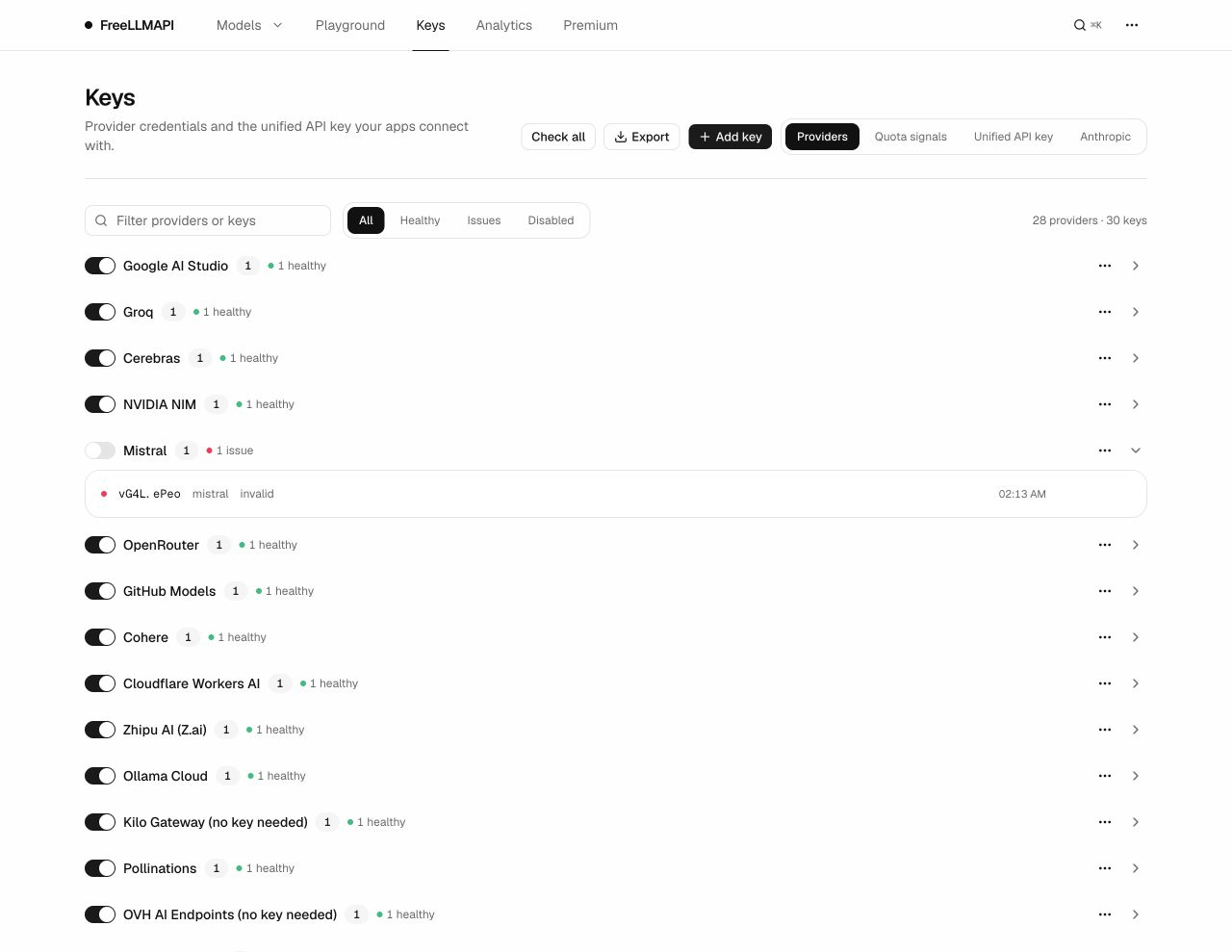
Tokens come from the providers, so the router needs your free keys. Sign up with a provider, create a key, and paste it into the app: the Keys section, the Providers tab, the Add key button.
The more providers you add, the more free tokens you get and the less often the router runs out of places to switch to. Three to five are enough to start. In the README screenshot two providers are marked no key needed: you can test the setup with them right away, without signing up.
- Google AI Studio: the Get API key button
- Groq: the API Keys section, the Create API Key button
- OpenRouter: the Keys section, the Create Key button
- Cerebras and Mistral: the keys section of the developer console
- Current limits for every provider are listed in the freellmapi.co/models catalog
Copy the unified key and check the gateway
Every program connects to the router with one unified key; it starts with freellmapi-. In the app it is in the icon popover, in the dashboard on the Keys → Unified API key tab. Do not publish it: whoever knows the key and the address uses your tokens.
Check that the gateway responds. The command below should return a list of models. The second command checks the whole installation.
curl -s http://localhost:3001/v1/models -H "Authorization: Bearer freellmapi-YOUR-KEY"

npx freellmapi doctor
Connect Claude Code: for one run or permanently
There are two modes; pick yours.
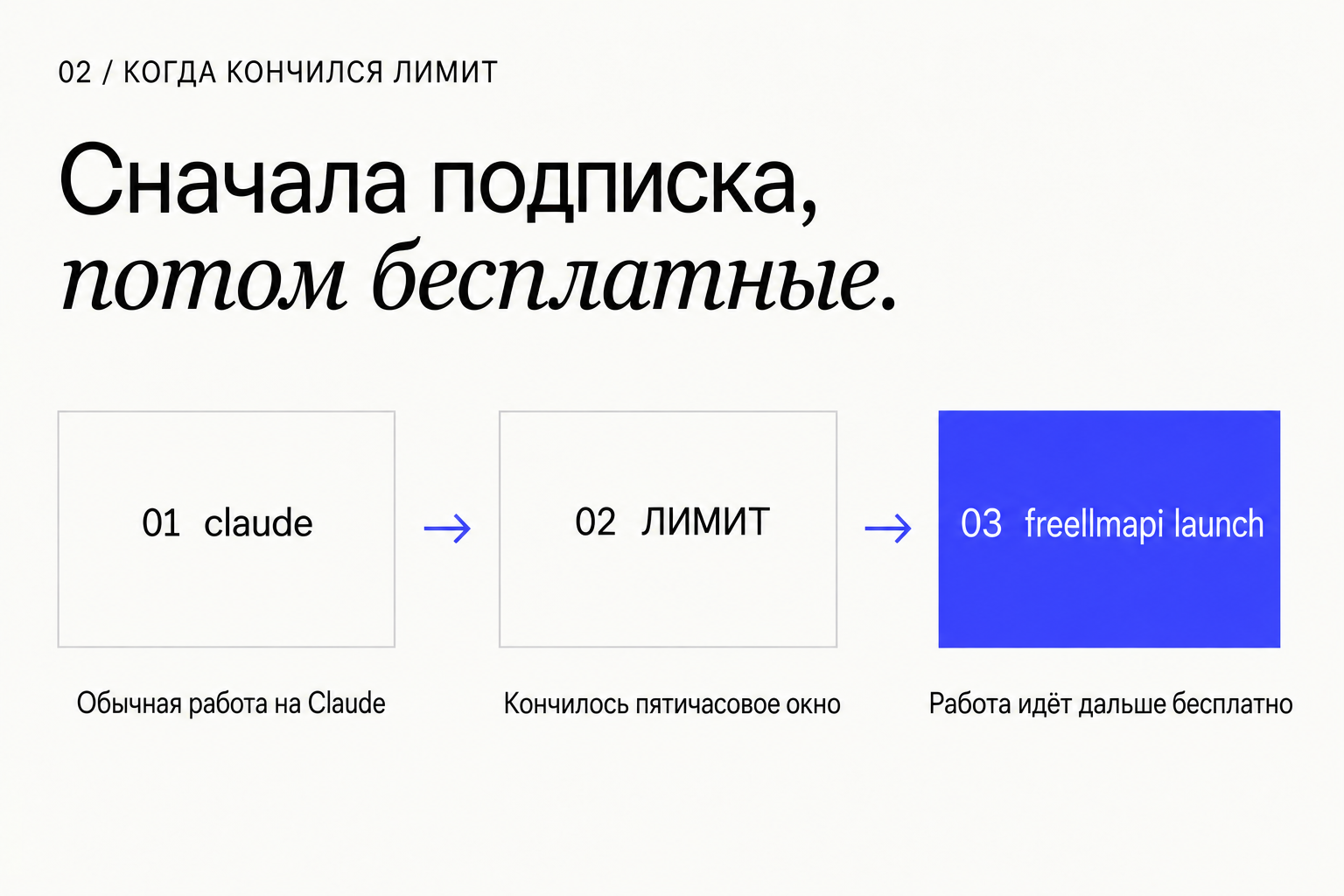
If you have a Claude subscription, work as usual, and when the limit runs out, start Claude Code with npx freellmapi launch. It starts Claude Code through the router for this run only and writes nothing to your settings. Close the session, and the next ordinary claude run is on your subscription again.
If you have no subscription, run npx freellmapi setup-claude. It writes the router address and key into ~/.claude/settings.json, and Claude Code will always run on free models. Before writing, it makes a timestamped backup of the file. With the --dry-run flag it only shows what it would change.
# Free mode for one run (macOS, Linux)
FREELLMAPI_API_KEY=freellmapi-YOUR-KEY npx freellmapi launch

# The same in Windows PowerShell
$env:FREELLMAPI_API_KEY="freellmapi-YOUR-KEY"; npx freellmapi launch

# Free mode always: preview first, then write
npx freellmapi setup-claude --api-key freellmapi-YOUR-KEY --dry-run
npx freellmapi setup-claude --api-key freellmapi-YOUR-KEY
How to work and what to tune
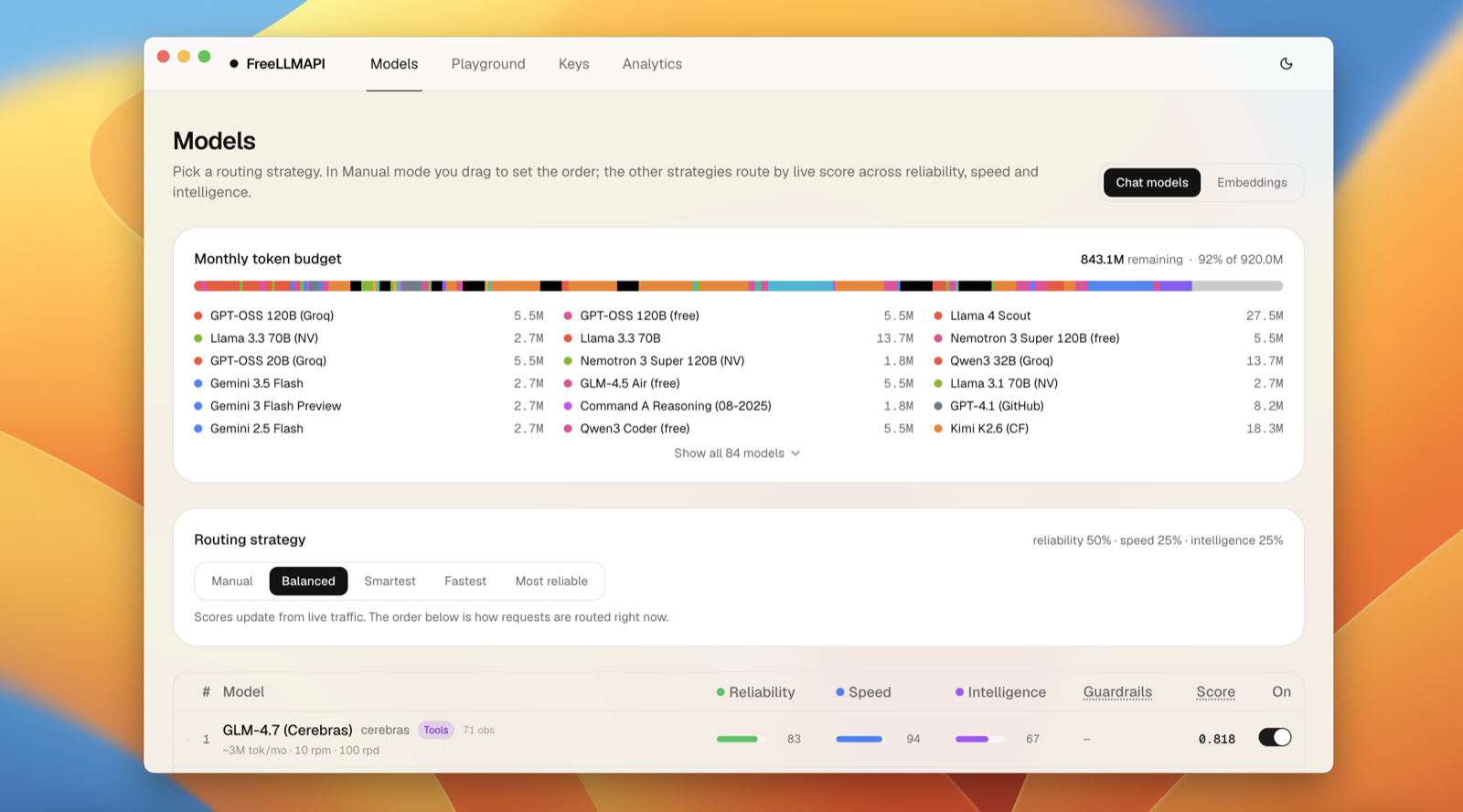
Work in Claude Code as usual. The router picks a model using the strategy on the Models page: Manual, Balanced, Smartest, Fastest or Most reliable. For coding it makes sense to start with Smartest; for quick small tasks Fastest works.
Claude Code still sends requests with Claude model names. On the Keys → Anthropic tab you can pin specific free models to those names. By default they all go to automatic selection.
If the router switches models mid-conversation, it can add a short note telling the new model that it is taking over someone else's task. In a server install this is enabled with FREELLMAPI_CONTEXT_HANDOFF=on_model_switch in the .env file.
Ask Claude Code to set it all up for you
Once the app is installed and the keys are added, you can hand the rest to Claude Code itself. Paste the prompt into a new session and insert your unified key. The prompt tells it not to change your settings without your separate consent.
You are my setup assistant. Goal: connect Claude Code to FreeLLMAPI so that when my Claude subscription limit runs out, I can keep working on free models.

What is already in place: the FreeLLMAPI app is running on this computer at http://localhost:3001, with free provider keys added. My FreeLLMAPI unified key: [PASTE KEY].

Work step by step and after each step briefly tell me the result:
1. Check that the gateway responds: request http://localhost:3001/v1/models with this key and name five models from the response.
2. Check that Node.js 20.18 or newer is installed, and run npx freellmapi doctor.
3. Without changing anything, show what npx freellmapi setup-claude --dry-run with my key would change.
4. Create a free-mode script in my home folder (macOS: claude-free.sh, Windows: claude-free.ps1). It runs npx freellmapi launch and takes the key from the FREELLMAPI_API_KEY environment variable. Explain how to set this variable once.
5. Explain in three lines: how I work normally, how I switch on free mode after the limit, and where to see which model answered.

Rules: do not write the key into project files or git. Do not change ~/.claude/settings.json without a separate "yes" from me. Do not delete anything.
The copy includes a link to the resource library. For agents ↗
Make sure a free model is answering
Do not ask the model who it is: free models often get their own name wrong. Look at the router's data instead.
- The Analytics section of the app shows requests, and the model and provider for each answer
- Every router response carries an X-Routed-Via header with the provider and model; the command below shows it
- The npx freellmapi doctor command checks the installation and connectivity
curl -si http://localhost:3001/v1/chat/completions \
  -H "Authorization: Bearer freellmapi-YOUR-KEY" -H "Content-Type: application/json" \
-d '{"model":"auto","messages":[{"role":"user","content":"Say hello"}]}' | grep -i x-routed-viaWhere the limits are
The free mode is good as a fallback after the limit and for simple tasks. For a large project Claude models are still stronger.
- Claude models do not answer. In complex multi-step tasks free models are weaker and make more tool-use mistakes
- Some models have a smaller context window: a long session may not fit
- Providers' free tiers and limits change every week. A free install gets catalog updates once a month; same-day updates cost 19 dollars a year or 49 dollars once
- Some providers may use free-tier requests to improve their models. Do not send confidential data this way
- Some providers are not available in every country; check each provider's terms
- The author calls the project a tool for personal experimentation
Sources & context
- FreeLLMAPI · GitHub (tashfeenahmed/freellmapi)
README: 7.4B tokens, 34 providers, 635 free endpoints, the Anthropic protocol for Claude Code, premium at 19 dollars a year.
- FreeLLMAPI · Releases (v0.11.1, 20.09.2026)
Apps for macOS (arm64, x64), Windows and Linux.
- FreeLLMAPI · Clients & coding agents
The setup-claude and launch commands, the context handoff note.
- FreeLLMAPI · CLI generators
What setup-claude writes into ~/.claude/settings.json, launchers that write nothing to disk.
- FreeLLMAPI · Install & deploy
The account-free app, the Docker install.
- FreeLLMAPI · model catalog
The free model list: Gemini, Qwen, Kimi, DeepSeek, GLM, Mistral, Llama, GPT-OSS; no Grok in the catalog.
- Claude Code · Advanced setup
Official install commands and system requirements.
- Claude · Pricing
Max from 100 dollars a month; every plan has a five-hour window limit and a weekly limit.
- Nick Saraev · Instagram reel, 316K views
The video whose claims are checked in this article.
See you in the next piece.
Back to the journal