
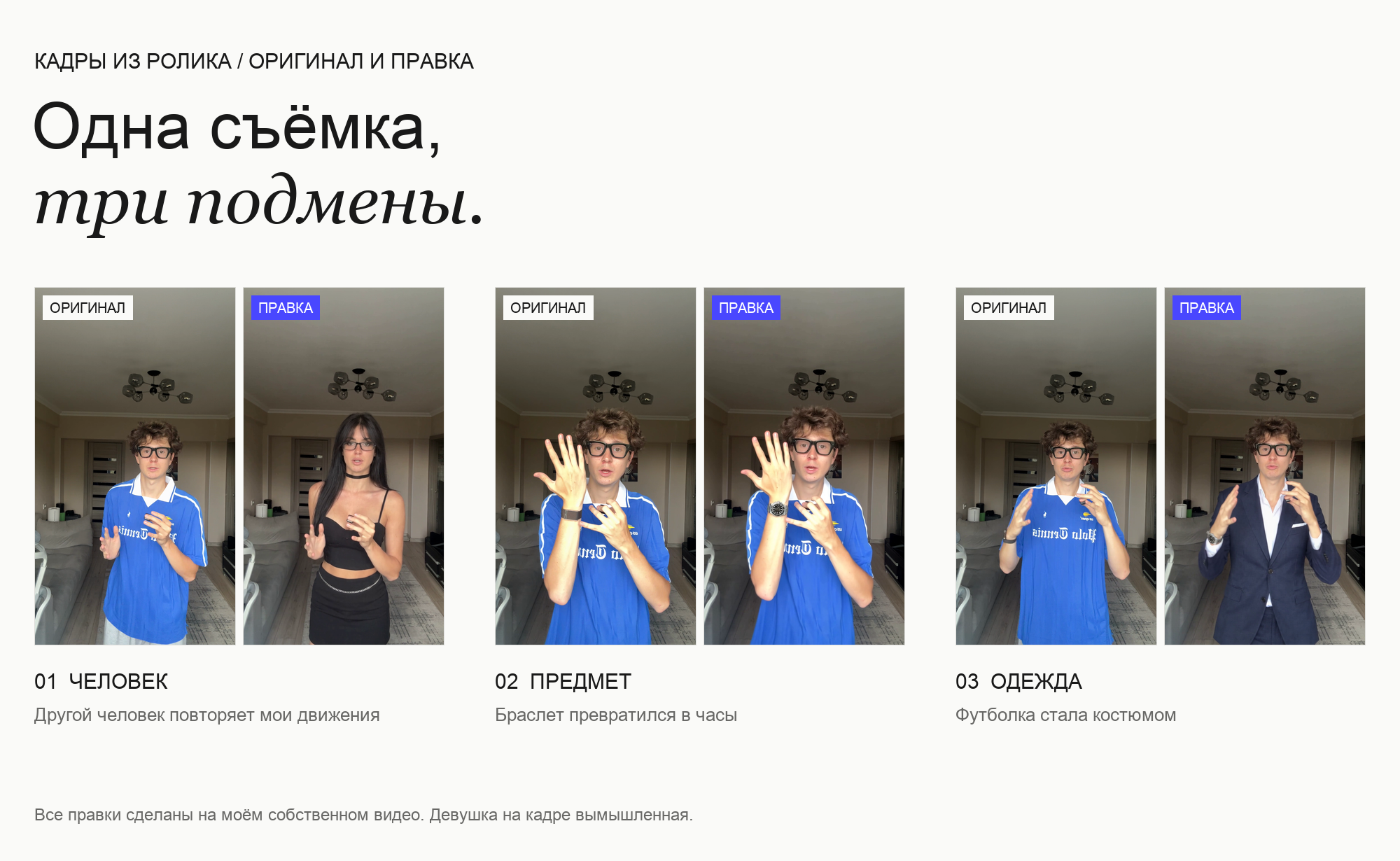
In the video I said: at any moment I can spin around and become another person, create any object on my hand in a second and put on any clothes. It is not an editing trick. Each of the three swaps was produced by a neural network from a single edited frame.
I did not make the video for the trick itself. If I can do this in one evening, so can someone who wants to call your mother wearing your face. So there are two parts below. The first: how a swap is created, with tools, prices, verbatim prompts and an agent brief, so that you can reproduce it on your own footage. The second: protection that does not depend on the quality of the fake, with a family memo and a payment policy for your team.
A note on limits. The part about creation is based on my work on this video: I only altered my own footage, and the woman in the frame is fictional. The part about scammers and protection relies on statements by regulators, police and the affected companies themselves. All links are at the end. I am not a security researcher and I did not test deepfake detectors myself.
You can no longer spot a good fake by eye, and it will only get harder. What protects you is not sharp eyesight but a routine: pause, verify through another channel, and use a code word you agreed on in advance.
What exactly I showed in the video
It is a single take shot on a phone from a tripod. It contains three swaps, and each answers its own question: can a person be replaced, can an object be added, can clothes be changed.
As I spin around, a woman appears in my place and repeats my gestures and facial expressions to the end of the sentence. Then, on my raised hand, the fitness band becomes an expensive watch. Three seconds later the jersey turns into a suit. The voice, the room, the light and the movements remain mine.
In the frames below the original is on the left and the result on the right. Both come from the same moment of the video.
From a single frame to a whole video
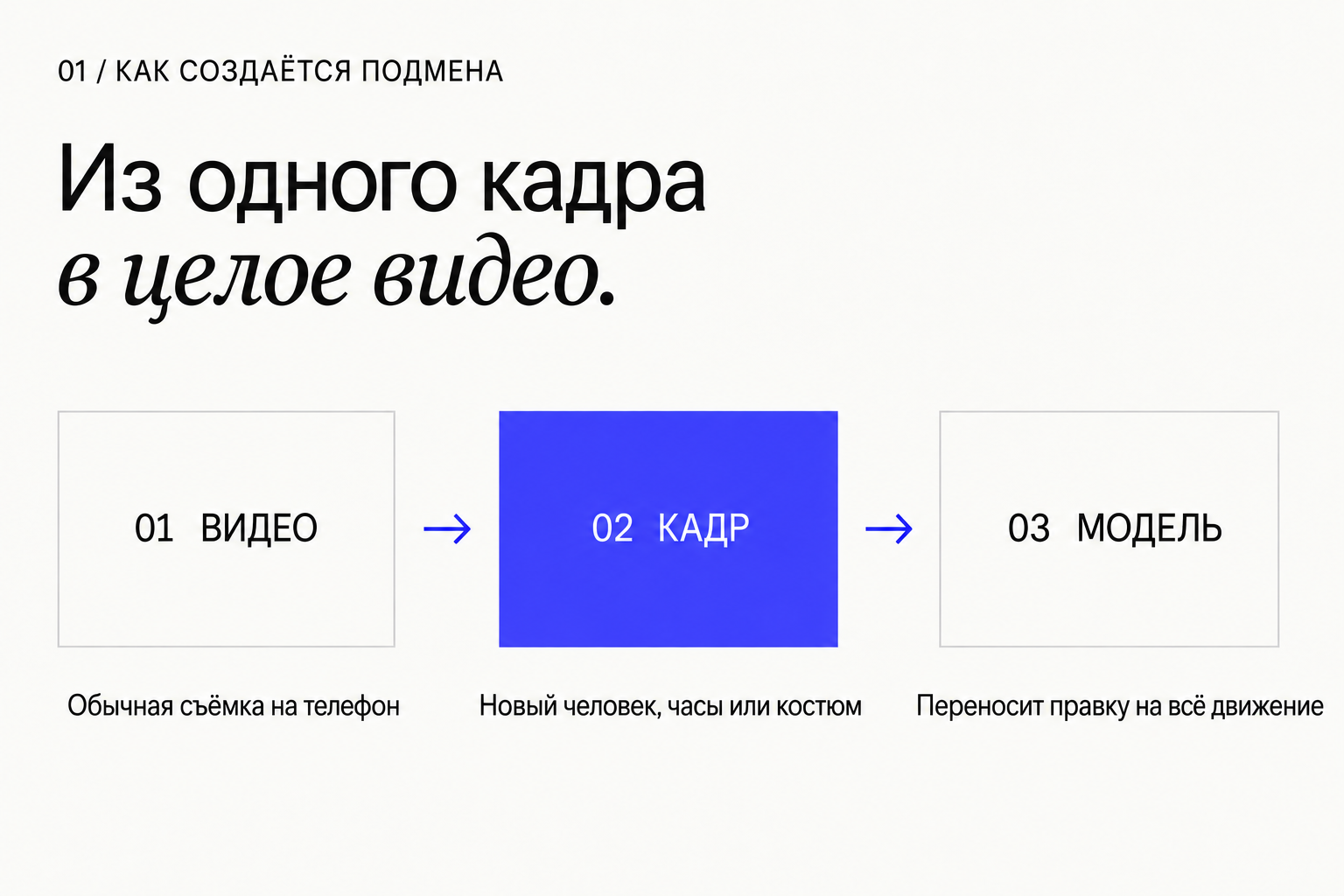
A swap like this used to require a studio, an actor and a visual effects artist. Today the process has three parts, and none of them requires editing skills.
Part one: ordinary video. I cut three short pieces out of my take: 7, 4 and 4 seconds.
Part two: one edited frame. I took a still from the video and asked an image model to change one thing in it: put another person in the same pose, replace the band with a watch, replace the jersey with a suit. That takes about 20 seconds per picture.
Part three: a video model in edit mode. It receives the source clip, the edited frame and a short instruction: change only this, leave everything else alone. The output is the same video with the same movements, facial expressions and sound, but with the swap in place. Each piece took two to four minutes to render.
Then I put the pieces back into the source. I hid the cut to the woman at the moment my back is to the camera. The other swaps are plain hard cuts: the movements match the original so closely that the picture changes while the gesture continues.
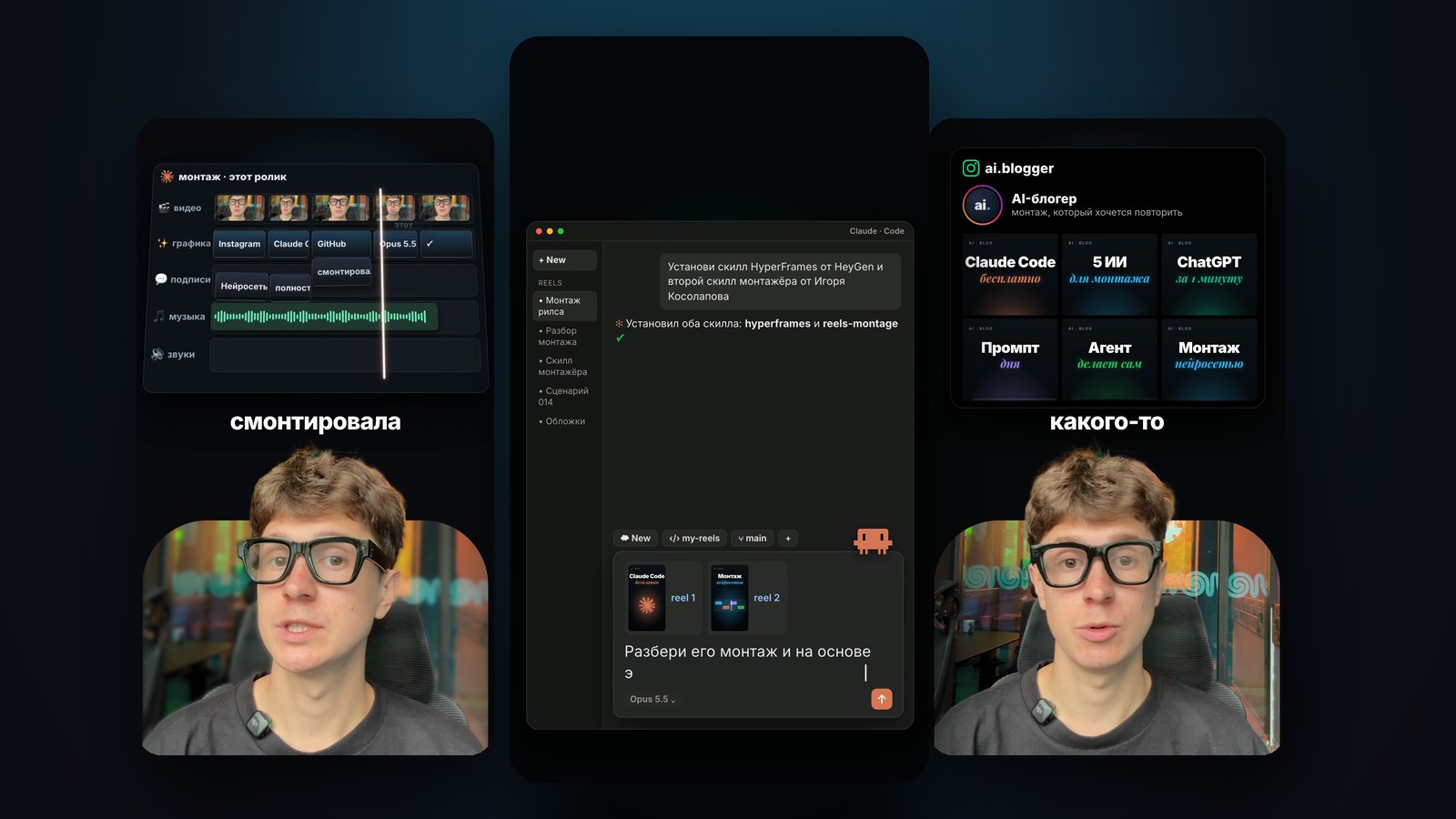
I ran the whole job through an agent in Claude Code: it cut the video, wrote the instructions for the models, checked the result frame by frame and assembled the final file. The generations themselves cost less than a dollar for the images and 360 credits of the video service for three clips.
- All it takes is ordinary phone footage and one edited frame.
- The model carries the edit across every movement, including the spin, gestures and facial expressions.
- The original audio is preserved, and the model copies the facial movements from the source footage.
- The inserts came out slightly softer than the original. I found no other difference in a frame-by-frame check.
What you need to reproduce this on your own video
Below is the full list of what the video was made with, with my real numbers. These are all ordinary public services. It makes sense to reproduce this on your own footage: in one evening you will understand what the technology can do and be able to show it to your family.
The whole kit is in the archive: the verbatim prompts, two ffmpeg scripts, an agent brief, a family memo and a payment policy template.
- ffmpeg: cutting, stills and assembly. Free.
- OpenAI Images API, model gpt-image-2.5-flare, the /v1/images/edits method: editing one frame. Size 1152x2048, quality=high, about $0.06 and 20 seconds per frame.
- Nano Banana 2 (gemini-3.1-flash-image) via Gemini CLI: changing the fictional character's outfit with a single /edit command.
- Seedance 2.5 in Dreamina, “全能参考” mode, the dreamina multimodal2video command: carrying the edit across the video. 24 credits per second at 720p, that is 96 for 4 seconds and 168 for 7 seconds. Rendering takes 2–4 minutes.
- Whisper API: timestamped transcription to choose the cut points.
- Claude Code: the agent that runs all of the above, looks at the frames itself and assembles the final file.
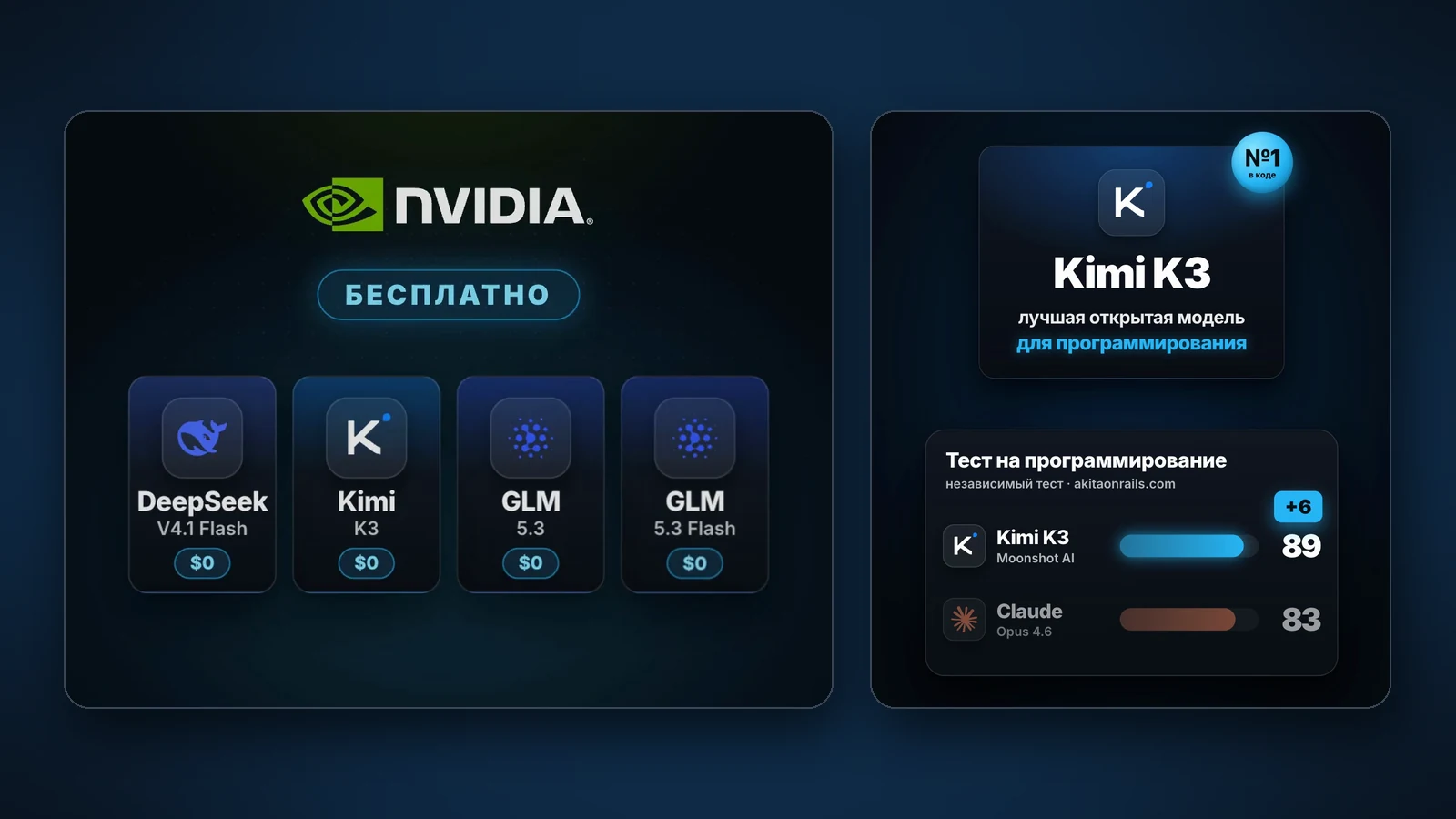
- Other video models with an edit mode: Kling, Runway Aleph, Gemini Omni Flash, the open Wan2.2-Animate. I did not test them in this project.
Cut a clip and one still
Shoot from a tripod and do not move the camera: it is easier for the model to preserve the background. Each swap needs a clip of 4 to 15 seconds and one still where the object is clearly visible.
Three details that cost me time. The video model takes 720p input. The frame count must be of the form 8n+1, otherwise the result comes back a third of a second shorter: 121 frames for 4 seconds, 209 for 7. And you must cut with the -vf option: with -filter_complex ffmpeg does not apply the phone's rotation and the video ends up on its side.
#!/bin/bash
# Вырезать кусок под правку и стоп-кадр. Usage: ./cut.sh input.mov START_SEC FRAMES name
# FRAMES должно быть 8n+1 при 30 кадрах/с: 121 = 4 c, 209 = 7 c, 301 = 10 c.
# Важно: режем через -vf (не -filter_complex), иначе ffmpeg не применит поворот видео с телефона.
set -e
IN="$1"; START="$2"; FRAMES="$3"; NAME="$4"
ffmpeg -y -ss "$START" -i "$IN" -frames:v "$FRAMES" -vf "fps=30,scale=720:1280" \
  -c:v libx264 -crf 16 -preset medium -pix_fmt yuv420p -c:a aac -b:a 128k -shortest "${NAME}_720.mp4"
# Стоп-кадр в полном разрешении из середины куска (подберите момент, где объект хорошо виден)
MID=$(python3 -c "print(round($START + $FRAMES/30/2, 2))")
ffmpeg -y -ss "$MID" -i "$IN" -frames:v 1 -q:v 1 "${NAME}_still.png"
echo "done: ${NAME}_720.mp4 + ${NAME}_still.png (t=$MID)"Still prompt: an object that looks real
The still is edited with the edits method: you upload the still and write what to change. The working formula has two parts: “one single change” and “everything else identical”, listing what must not be touched.
My first version of the watch came out flat, like a sticker. A separate paragraph on the physics of the object fixed it: case thickness, tilt along the wrist axis, the bracelet disappearing behind the arm, a shadow on the skin, reflections of this room, the same sharpness and noise as the hand next to it. Below is the verbatim prompt that produced the result in the frames above. Replace the watch description with your own object.
Edit this photo with one single change: the man is now actually wearing a real Rolex Submariner Date on his raised wrist instead of the brown fabric fitness band. It must look like a physical heavy steel object photographed in this room, not a flat graphic pasted on the skin.
Physical realism requirements: the 41 mm steel case has real thickness (about 12 mm) with a visible side profile, crown and crown guards; the watch sits slightly rotated and tilted, following the exact angle and curvature of his wrist, not perfectly frontal; the Oyster three-link steel bracelet wraps around the wrist, curves away and disappears behind the arm, slightly loose with a small gap on one side; the case and bracelet cast a soft, clearly visible shadow onto the skin on the side away from the window, and the skin is slightly pressed under the bracelet edge; the domed sapphire crystal and polished steel reflect this beige room and the window as soft, low-contrast highlights, with the black dial slightly dimmed by glare; black ceramic bezel, luminous markers, Mercedes hands, cyclops date lens.
Match the photo exactly: same soft diffuse indoor daylight, same colour temperature, same smartphone front-camera sharpness, slight softness and sensor noise as the hand next to it, no studio lighting, no extra sharpening, no glow.
Everything else must stay identical: the man's face, glasses, curly hair, expression, both hands and all fingers, the blue jersey, the room, the framing. No added text, no watermark.
Still prompt: changing clothes
Here two images go into the model: the still and the previous result with the watch, so that the object stays the same. The prompt refers to them as the first photo and the second photo.
A mistake of mine that is easy to repeat: I changed the watch, but the old description stayed in this prompt's text. The model obeyed the text, not the image. If you change the object, update its description in every prompt.
Edit the first photo with one change of wardrobe: replace the man's oversized blue football jersey with an impeccably tailored dark navy two-piece suit, a crisp white dress shirt with an open collar and no tie, a white pocket square, the jacket fitted at the shoulders and buttoned once, suit trousers instead of the grey shorts. Replace the brown fabric fitness band on his wrist with the same stainless steel Rolex Submariner with a black dial, black ceramic bezel and steel Oyster bracelet shown on his wrist in the second photo (steel, not gold), peeking out from under the shirt cuff. Everything else must stay identical to the first photo: the man's face, black glasses, curly hair, expression, the exact pose and both hands with all fingers and the small black object he holds, the room, the lighting, the framing. Photorealistic vertical smartphone front-camera video frame, natural indoor daylight, realistic fabric folds following the raised arms, no text, no watermark.
Still prompt: a fictional person in your pose
The character is created the same way, by editing your still: the same angle, the same pose, the same object in the hand. This matters because the video model later takes the appearance from the picture and the movements from your video.
Describe the invented person in words: age, hair, clothes. Do not upload photos of real people: that is a deepfake of a person without their consent, and the agent refuses such a request. I later changed the outfit with a single /edit command in Nano Banana 2, using the same formula: change only the clothes, keep everything else.
Edit this photo: replace the young man with a completely different person, a glamorous, beautiful adult woman in her late twenties with a fashion-model look. Long straight glossy black hair with curtain bangs, elegant evening makeup, thin rectangular glasses, a black velvet choker. She wears a stylish fitted black square-neck top and a black high-waisted skirt, a chic night-out outfit. She stands at exactly the same spot and the same distance from the camera, in the same body pose with the same hand gesture as the man: both hands raised in front of the chest mid-explanation, holding the same small black object between the fingers of the raised hand, mouth slightly open as if talking, looking into the camera. Keep the room, grey couch, door, ceiling lamp, lighting, camera angle, framing and colors identical to the original photo. Photorealistic vertical smartphone front-camera video frame, natural indoor daylight, natural skin texture, no beauty-filter look, no text, no watermark.
The video model: a strict edit, not a re-shoot
Seedance 2.5 receives the source clip, the edited still and a prompt in Chinese: the model was trained on Chinese vocabulary and follows it more precisely. In the prompt the video is called 视频1 and the picture 图片1.
The key phrase is 严格编辑视频1, “strictly edit video 1”. If you write 参考视频1, “use the video as a reference”, the model re-shoots the scene loosely and the movements drift away from your audio. Then three rules: one edit per run, list everything that must not change, and say “no music” twice, at the start and at the end. Otherwise the model adds a background tune.
Start with the shortest clip: my 4-second test cost 96 credits and showed that the service accepts my footage. If a file fails to upload, the command fails before credits are charged and can simply be repeated. Below are the command and the object prompt with a translation. The clothes and character prompts are in the kit.
dreamina multimodal2video \
  --video ./object_720.mp4 \
  --image ./object_still_edited.png \
  --prompt "$(cat video-object.txt)" \
  --model_version seedance2.5 --ratio 9:16 --duration 4 --video_resolution 720p --poll 0

dreamina query_result --submit_id=<id> --download_dir=./out

无音乐、无BGM、无配乐。严格编辑视频1,只做一处修改:把视频1中男人手腕上的棕色编织手环修改为图片1中他手腕上佩戴的那只劳力士潜航者腕表(钢壳、黑色表盘、黑色陶瓷表圈、三格蚝式钢表带),全程佩戴。腕表是有厚度、有重量的真实钢制物体:随手臂抬起、转动、放下同步运动,表带环绕手腕,表壳在皮肤上投下柔和阴影,表镜和钢面反射房间的柔和自然光。
其余内容不要变化:男人的脸、黑框眼镜、卷发、表情、口型、双手和每根手指的动作、蓝色球衣、房间、光线、机位、构图完全不变,不要切镜。保持原音频不变。无字幕、无文字、无水印。无音乐、无BGM、无配乐。

Translation: No music. Strictly edit video 1, one change only: replace the band on the wrist with the watch from image 1, worn for the whole clip. The watch is a real steel object: it moves with the arm, the bracelet wraps the wrist, soft shadow on the skin, reflections of the room. Change nothing else: face, glasses, hair, expression, lip movement, hands and fingers, clothes, room, light, framing; no cuts. Keep the original audio. No subtitles, text or watermarks. No music.
Check frame by frame and assemble
Before assembling, compare the insert with the source. I built a sheet with the source on top and the result below at two frames per second, compared mean brightness and colour, and checked the audio. The outcome: poses matched at every sample, brightness differed by no more than one level, and the audio in the clip was the original with no offset. So the inserts drop onto the timeline frame for frame, and the audio can be taken entirely from the source.
Cut points. I hid the person swap in a frame where my back is to the camera: on adjacent frames it is my back and then the character's back. The object and the clothes switch with a hard cut in the middle of a gesture. The inserts come out at 720p and 24 fps; the script brings them to 1080p and 30 fps.
assemble.shRead the full file
#!/bin/bash
# Сборка: исходник + AI-вставки, звук оригинальный. Отредактируйте таймкоды под своё видео.
# Вставка выровнена с исходником по времени, поэтому смещение внутри клипа = t_исходника - t_начала_куска.
set -e
SRC="input.mov"; T="_segs"; mkdir -p "$T"
ENC="-c:v libx264 -crf 17 -preset medium -pix_fmt yuv420p -an"
src(){ ffmpeg -v error -y -ss "$2" -to "$3" -i "$SRC" -vf "fps=30,scale=1080:1920" $ENC "$T/$1"; }
ai(){  # out clip clip_start_in_source from to
  off=$(python3 -c "print(round($4-$3,3))"); dur=$(python3 -c "print(round($5-$4,3))")
  ffmpeg -v error -y -ss "$off" -t "$dur" -i "$2" -vf "fps=30,scale=1080:1920:flags=lanczos,unsharp=5:5:0.5" $ENC "$T/$1"; }

src 01.mp4 0 6.05                      # я, до разворота спиной
ai  02.mp4 person_ai.mp4 5.10 6.05 12.05   # персонаж: вход в момент, когда лицо не видно
src 03.mp4 12.05 15.90
ai  04.mp4 object_ai.mp4 14.40 15.90 18.28 # предмет: жёсткая склейка на поднятой руке
ai  05.mp4 clothes_ai.mp4 18.00 18.28 21.48 # одежда
src 06.mp4 21.48 60.00

: > "$T/list.txt"; for f in 01 02 03 04 05 06; do echo "file '$PWD/$T/$f.mp4'" >> "$T/list.txt"; done
ffmpeg -v error -y -f concat -safe 0 -i "$T/list.txt" -c copy "$T/video.mp4"
# Звук берём целиком из исходника: губы и жесты во вставках совпадают с ним по времени
ffmpeg -v error -y -i "$T/video.mp4" -ss 0 -to 60.00 -i "$SRC" -map 0:v -map 1:a -c:v copy -c:a aac -b:a 192k -shortest -movflags +faststart final.mp4Hand all of this to an agent
In the video I promised to show how to connect code so that such videos are assembled automatically. Here is a brief you can start with in Claude Code or another agent with terminal access. You will need ffmpeg installed and service keys in environment variables.
The brief has boundaries built in: your own footage only, fictional characters only, a stop before every paid generation, and an honest report of what was verified. Do not remove them. An agent without boundaries will spend your money and do something you will regret.
You are my video engineer. Task: in my own vertical video, make short inserts where a neural network changes an object, the clothes, or replaces me with a fictional character, then assemble the final video with the original audio.

Boundaries you must not cross:
- We work only with footage where I am the person in frame, and only with fictional characters. Do not use photos or videos of other real people, even if I ask.
- Do not look for or apply ways to bypass service filters. If a service refuses, tell me and suggest an acceptable alternative.
- Before every paid video generation show me what you are sending, the duration, resolution and expected cost. Wait for my “yes”.
- API keys are in environment variables. Do not print them or write them into files.

Inputs: path to the video [PATH]; what I want to change [OBJECT / CLOTHES / CHARACTER and their description].

Order of work:
1. Inspect the video with ffprobe: duration, resolution, rotation, frame rate. Build contact sheets at one frame per second and look at them.
2. Transcribe the speech with timestamps. Propose where each swap goes. A full person swap only where the face is not visible: a spin with the back to camera, leaving the frame, a hand covering the face. Objects and clothes tolerate a hard cut.
3. For each swap cut a 4–15 second clip: 720x1280, 30 fps, frame count 8n+1, keep the audio. Cut with -vf so that phone rotation is applied.
4. For each swap extract a full-resolution still where the object is clearly visible.
5. Edit the still in an image model (the latest OpenAI Images model via /v1/images/edits, or Nano Banana): one change, everything else identical. For objects demand physical realism: thickness, a shadow on the skin, light and sharpness matching the frame. Look at the result yourself and redo it if the object looks pasted on. If the object description changes, update it in every prompt.
6. Show me the stills. After my “ok”, send to a video model in edit mode (Seedance 2.5 or similar): the source clip, the edited still and the instruction “strictly edit video 1, only this change, leave everything else, keep the original audio, no music”. One edit per run. Start with the shortest clip as a test. Retry upload failures, they are free; do not work around a moderation refusal.
7. Compare the result with the source: a sheet with the source on top and the result below at two frames per second, mean brightness and colour, audio correlation and offset. Tell me honestly what differs.
8. Assemble the final: cut the source and the inserts into segments with identical encoding settings, bring the inserts to 30 fps and the source resolution, join with concat, lay the original audio track underneath.
9. Check every cut point frame by frame. Send me a 720p preview and a 1080x1920 master.

In the report state what was done, what was actually verified, how much was spent and what remains unverified.
The copy includes a link to the resource library. For agents ↗
You cannot rely on service filters
Along the way I ran into restrictions. The image model refused three times to produce a revealing female look. The video service says in its documentation that it does not accept footage with real people's faces without identity verification, although it did accept my own video. And the agent refused a request to put a photo of a real woman into the video: that would have been a deepfake of a specific person without her consent.
But these restrictions only work for people who use major services and follow the rules. Open models, such as Alibaba's Wan2.2-Animate, are freely available and run on your own computer. The rules of major services do not apply to them. So protection cannot be built on the hope that “the neural network won't allow it”.
Video is only one of the forms
My swap was made on existing footage. Scammers have a wider toolkit, and video is not the most common item in it.
Voice. Microsoft's research model VALL-E reproduced a person's voice from a three-second recording back in January 2023. In March 2026 Interpol wrote that ten seconds of audio is enough for a clone. A voice message in a messenger or a story with your speech meets that requirement. Meanwhile, in March 2025 Consumer Reports tested six voice-cloning services: in four of them a checkbox was enough to confirm the consent of the voice's owner.
A face in a live call. In July 2026 Russia's Interior Ministry described three real-time modes: an “animated” photo, a face mask over the caller's own face, and a fully autonomous avatar. In October 2024 Hong Kong police arrested 27 people who swapped faces right in video calls on dating sites; losses were estimated at HK$360 million.
Messages from a real account. In August 2024 the Bank of Russia warned about this scheme: attackers break into an account, take photos and voice recordings from it, produce a video asking for money and send it to the owner's contacts. In October 2025 the Interior Ministry reported a case in St Petersburg: a hacked Telegram account and fake voice messages cost a person 117,000 roubles.
Documents and ads. The FBI's December 2024 warning also lists forged identity documents, fake photos used to “prove” a story, and ads featuring celebrities' faces. In France a woman handed over about 850,000 dollars in a year and a half to someone posing as Brad Pitt who kept sending generated photos.
The fake is only half of the scheme
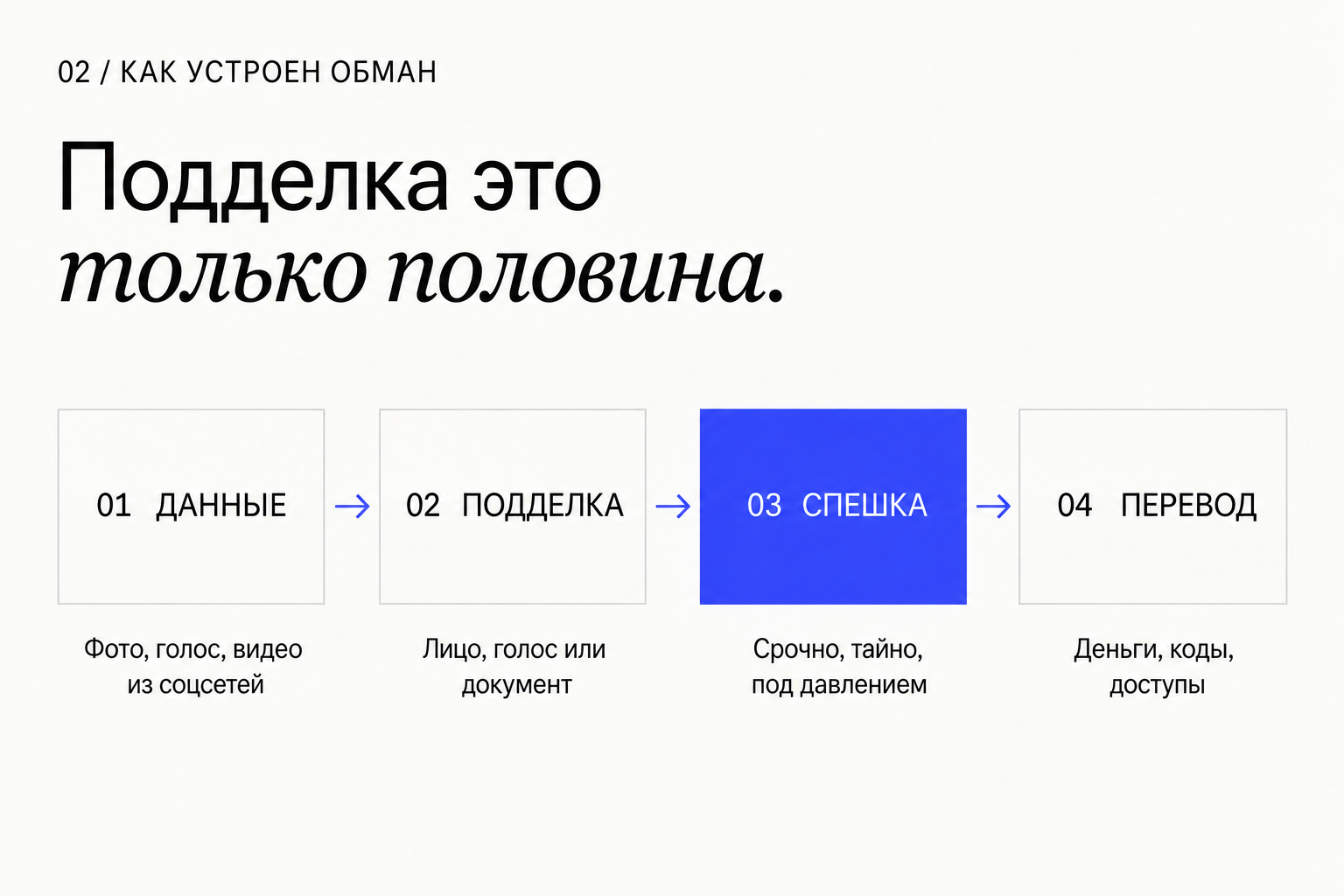
The same chain repeats in all these stories. First, data is collected: photos, voice, video, job titles, colleagues' names. Then the fake is made. Then urgency and secrecy are created. Only after that does the person press “transfer” themselves.
Arup, Hong Kong, 2024. A finance employee at the engineering firm joined a video call with the chief financial officer and colleagues. All of them turned out to be fake. HK$200 million, about US$25.6 million, went to five accounts. The company confirmed that “fake voices and images” were used.
Singapore, March 2025. A finance director joined a Zoom call with deepfaked executives and transferred more than 499,000 US dollars. The scammers then asked for another 1.4 million. Singapore and Hong Kong police managed to withhold the transferred money.
Ferrari, July 2024. An executive received messages and a call in the voice of CEO Benedetto Vigna. He asked a personal question: which book Vigna had recently recommended to him. The call ended and the company lost nothing. Bloomberg and Fortune reported this citing sources at the company.
LastPass, April 2024. An employee received WhatsApp calls and a voice message in the CEO's voice. He ignored them because of the unusual channel and the forced urgency, and reported it to security. The company described the case on its own blog.
Families. In the FBI's 2025 report, 22,364 complaints mention artificial intelligence, with losses of 893 million dollars. People over 60 lost 7.7 billion dollars to all kinds of internet fraud. According to the US Federal Trade Commission, impostor scams took 3.5 billion dollars in 2025.
Note what saved the day in two of the four cases. Not detecting the fake, but a personal question and distrust of an unusual channel.
It is too late to look for the sixth finger
The advice to “look at the fingers, shadows and blinking” dates from the time when fakes were crude. MIT's Detect Fakes project lists eight such cues and itself notes that high-quality fakes are not easy to discern.
The numbers confirm it. A 2024 meta-analysis pooled 56 studies with 86,155 participants. Overall human accuracy in detecting fakes was 55.5 percent, which is statistically no different from tossing a coin. For video the result was 57.3 percent.
Sometimes traces remain. In the Singapore case of May 2026, police noticed that the fake officials' lips did not match the audio. But you cannot count on that: in my video the audio is original, and the model copies the facial movements from the source footage. In May 2025 the FBI wrote plainly that AI-generated content is often difficult to identify.
It is too early to rely on detector software either. In January 2025 the UK National Cyber Security Centre called such tools ineffective and unreliable. Provenance labels help only in part. The C2PA standard records a file's history but does not look for fakes, and the SynthID watermark exists only on what Google's models create. A video made with an open model on someone else's computer will arrive with no labels at all.
Two free tools are still worth knowing. At contentcredentials.org/verify you can upload a file and see its provenance label, if it has one. In the Gemini app you can upload a picture or a video and ask whether it was made with Google AI: the app looks for the SynthID watermark. Both tools answer only one question: is there a label. The absence of a label proves nothing.
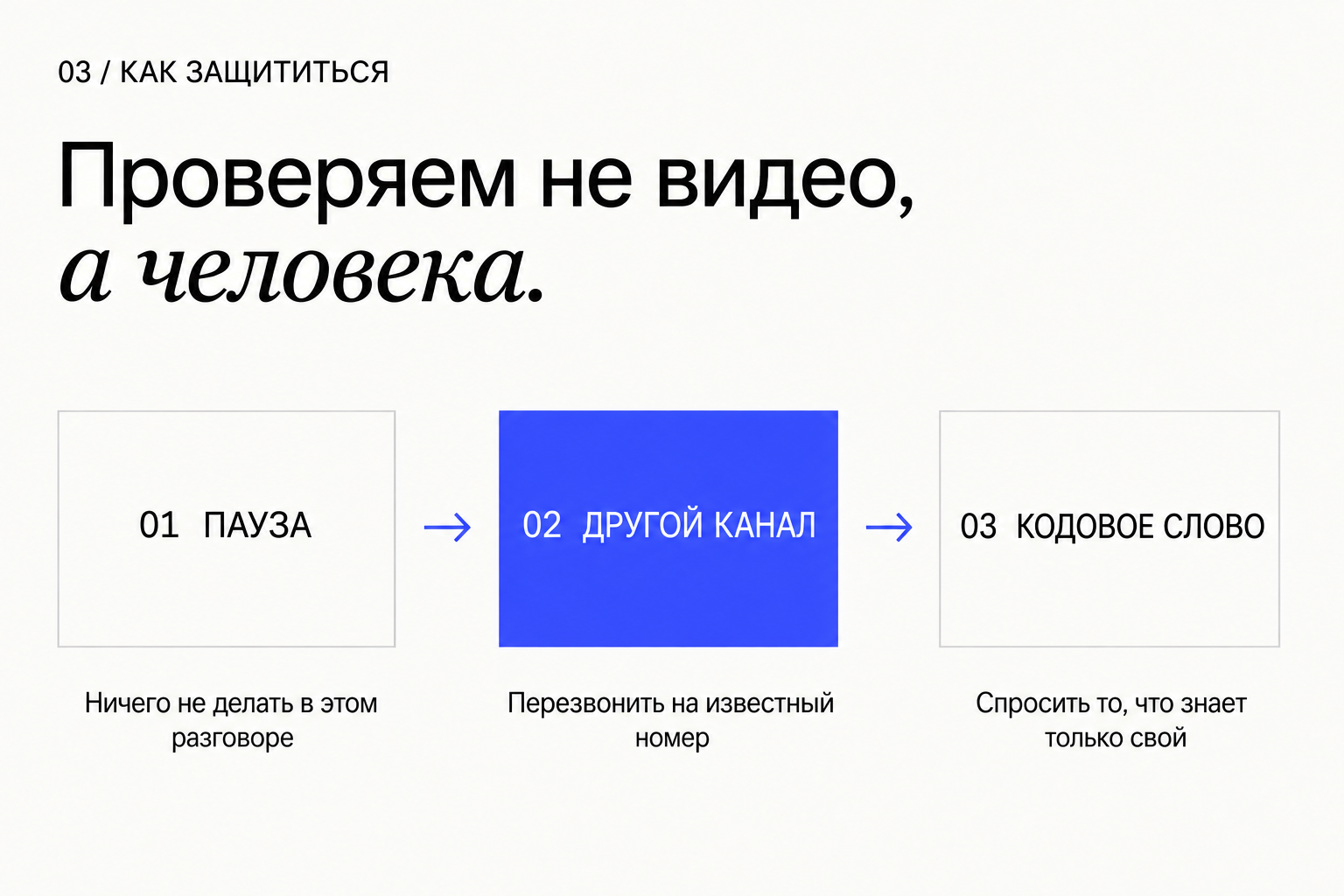
Hence the main conclusion of this article: verify not the picture but the person and the request.
Agree on a word that is not on the internet
Gather the family and choose a word or a short phrase. Only your people know it, it is not related to names, dates or pet names, and it is never written in messengers.
There is one rule: if a relative asks for money, codes or urgent help by phone, video or voice message, you ask for the word. No word, no action. Nobody takes offence at the question; that is part of the agreement.
Set up the same kind of word for your team if you have employees with access to money.
How to choose. A good word is an absurd combination you invented together, such as “green tram on Thursday”. A bad word is a pet's name, a street, a date of birth, a maiden name. All of that is on social media. What to tell your parents: “I love you, but we have a rule. Say the word and I'll call you back myself.” The memo below can be printed and put on the fridge.
- The word was chosen aloud, in person.
- Parents and phone-using children know it.
- It is not written down anywhere in chats.
Call back yourself, on a known number
Verify any request for money or access through a channel that you chose, not the one the caller chose. Hang up and dial the number from your own contacts. If a “boss” writes from a new account, message them in the work chat or call their usual number.
A request such as “don't call back, I'm in a meeting” or “don't tell anyone” is not a reason to skip the check. It is the main sign that a check is needed.
If you cannot call back, ask a question whose answer is not on the internet. That is exactly how the attack on Ferrari was stopped. Questions that work: “What did we eat last Sunday?”, “What did I give you for your last birthday?”, “What did we argue about last week?”. Questions that do not: a pet's name, a school, a city of birth.
Remove the option to pay alone and urgently
In a company the scammer attacks not the technology but the person who can send a payment. Make sure one person cannot do it on the strength of one call.
Write down simple rules and explain them to everyone who handles money. A video call with the director does not count as confirmation. A second person and a check through a known channel do.
Below is a ready-made nine-rule policy template. Fill in your thresholds and names, send it to everyone who handles payments, and go through it aloud once.
- A payment to a new recipient or above a threshold is approved by two people.
- A change of supplier bank details is verified by calling the number in the contract, not the one in the email.
- Urgency does not cancel the rules. “Needed within the hour” means “we check more carefully”.
- An employee who paused a payment for verification is always right, even if the call was real.
payment-policy.mdRead the full file
# Payment verification policy (template)

Goal: no payment leaves on the strength of a single call, message or video meeting.

1. The following do NOT count as proof of identity: a voice, a video call, a messenger message, an email, even from a corporate address.
2. Two people. A payment to a new recipient, a payment above ______ and any change of bank details require approval by a second employee from this list: ______.
3. Callback. The initiator of a payment is verified by calling the number in the internal directory. A supplier's change of bank details is verified by calling the number in the contract, not the one in the email.
4. The executive code phrase for urgent instructions is kept by ______, changed quarterly and after any incident.
5. Urgency and secrecy. Requests such as “urgent”, “tell no one”, “this is a regulator's check” automatically move the payment into enhanced verification.
6. Channels. Payment instructions are accepted only in ______ (the work system). Personal messengers and new accounts are not used.
7. The right to stop. Any employee may pause a payment for verification. Nobody is punished for pausing, even if the instruction turns out to be genuine.
8. Incident. If in doubt: stop the payment, inform ______, call the bank to recall the transaction, keep recordings and correspondence, notify staff of the attempt.
9. A drill once a quarter: a test request “from the director” from a new account. The result is reviewed without penalties.

Policy owner: ______. Review date: ______.
Lock the door to your messengers
The most convincing fake arrives from a real account. Scammers break into a messenger, take voice messages from it and send friends a request to lend money in a familiar voice. The Bank of Russia warned about this scheme in August 2024 and the Interior Ministry in October 2025.
Turn on two-step verification with a separate password in every messenger and mailbox. Never read out SMS codes, not even to a “support agent”. Check the list of active sessions and end the ones that are not yours.
- Telegram: Settings → Privacy and Security → Two-Step Verification. Then Settings → Devices → Terminate All Other Sessions.
- WhatsApp: Settings → Account → Two-step verification. Then Settings → Linked devices, remove the ones you do not recognise.
- The mailbox your messengers and bank are tied to: sign-in confirmed through an app, not only by SMS.
- Never read out a code from an SMS or an app to anyone. Real support does not ask for it.
Show this to your parents
The main audience of this article is not you but the people you will forward it to. Older relatives find it harder to believe that a video with their grandchild's face may be unreal.
Show them my video or the frames above and say one sentence: “If I ask for money, ask for the word and call me back yourself.” That is enough. There is no need to explain how neural networks work.
For people living in Russia there are two free settings worth enabling for your parents in one evening. A self-imposed ban on loans: since 1 March 2025 it can be set on the Gosuslugi portal; it covers consumer loans and credit cards and can only be lifted with a delay. And the “second hand” service: since 1 September 2025 banks let a customer appoint a trusted person who confirms transfers and cash withdrawals. The helper has up to 12 hours to decide, and without a response the transaction does not go through. In other countries, ask your bank about trusted-contact and transaction-approval features.
- You showed them the video or the frames.
- You agreed on a word and handed over the memo.
- You turned on two-step verification in their messengers.
- In Russia: the loan self-ban and the “second hand” service.
Act within the first minutes
Call your bank at once using the number on the card and ask them to stop the transaction and block the card. Then file a police report and keep everything: numbers, accounts, recordings, screenshots. Warn your family and colleagues that your likeness or account is being used.
Do not pay anyone who then offers to “recover the money for a fee”. That is the second wave of the same scheme.
Ask your assistant to help you pause
This prompt does not detect a fake. It does what is hard to do yourself under pressure: breaks the situation down into signals and suggests a check. Paste it into any assistant together with the message text. Do not paste passwords, codes or card details into the assistant.
You are helping me check a message or a call for signs of fraud. You cannot know for certain whether it is fake, and you must not claim that you do. Your job is to help me avoid acting in a hurry.

The situation (I paste the message text, a call transcript, or a description of the video):
[PASTE HERE]

Who is supposedly contacting me and what they ask for:
[WHO AND WHAT]

Do four things.
1. List the pressure signals: urgency, secrecy, a request not to call back, a new number or account, an unusual payment method, a request to read out an SMS code.
2. State what action they want from me and what I lose if this is a scam.
3. Suggest a check through another channel: whom to call on which previously known number, and which question only the real person could answer.
4. Write a short reply I can send right now to buy time without promising anything.

Do not ask me for passwords, codes, or card details. If the information is insufficient, ask me up to three clarifying questions.
The copy includes a link to the resource library. For agents ↗
Run a drill
A rule that has never been used will not work when it is needed. A week after the conversation, call your mother from an unknown number and ask her to transfer a small amount. See whether she asks for the word.
In a team, ask a colleague to message the accountant as the director from a new account and request an urgent payment. The goal is not to catch a person making a mistake but to make sure the routine is clear and nobody is embarrassed to use it.
- A family member asked for the word without prompting.
- The accountant paused the payment and called back on a known number.
- Nobody was scolded after the check.
What this article does not promise
The six-step routine reduces risk but does not guarantee anything. It will not protect a person who decides not to check. I did not test deepfake detectors or compare models against each other. The amounts and dates of the cases are given according to the listed sources as of 20 September 2026; company statements about their own incidents may be incomplete.
My experience of making a swap is limited to one video, one person in the frame and a static camera. With different footage the result may be worse or better.
Sources & context
- FBI PSA I-120324: Criminals Use Generative AI to Facilitate Financial Fraud (3 Dec 2024)
Types of fakes and the advice to agree on a secret word with family.
- FBI PSA I-051525: impersonation of senior officials (15 May 2025)
Advice to find the number independently and call back; acknowledgement that AI content is hard to identify.
- FTC: Scammers use AI to enhance their family emergency schemes (20 Mar 2023)
Do not trust the voice; call back on a number you know.
- FBI IC3 2025 Annual Report
22,364 complaints mentioning AI with $893.3M in losses; $7.748B lost by people aged 60+.
- FTC: people reported losing $3.5 billion to imposter scams in 2025 (15 Jun 2026)
Data on impostor scams. The release does not mention AI.
- CFO Dive: Scammers siphon $25M from engineering firm Arup via AI deepfake ‘CFO’ (May 2024)
The Arup case as reported by Hong Kong police and confirmed by the company. Secondary source.
- Singapore Police Force: over $670,000 recovered in a deepfake video-call scam (7 Apr 2025)
A Zoom call with deepfaked executives; more than US$499,000 transferred.
- Singapore Police Force: footage from a Zoom conference impersonating senior officials (16 May 2026)
Police note that the fake officials' lips were out of sync with the audio.
- Fortune: Ferrari exec foils deepfake attempt with a personal question (27 Jul 2024)
Based on Bloomberg reporting citing anonymous company sources. Secondary source.
- LastPass blog: attempted audio deepfake call targets LastPass employee (10 Apr 2024)
The company itself describes the attempt and why the employee recognised it.
- The Record: Hong Kong police bust romance scammers using face-swapping deepfakes (Oct 2024)
27 arrests, HK$360M in losses, face swapping in live video calls.
- CBS News: woman loses life savings to scammers posing as Brad Pitt (15 Jan 2025)
About $850,000 over a year and a half, with generated photos as “proof”.
- Известия: ЦБ предупредил об использовании мошенниками дипфейков (15 Aug 2024)
A report on the Bank of Russia warning; we could not open the original on cbr.ru.
- Петербургский дневник: МВД о схеме с подменой голоса в Telegram (27 Oct 2025)
A hacked account and fake voice messages, 117,000 roubles lost. Secondary source.
- МВД (по сообщению ТАСС): дипфейки в режиме реального времени (6 Jul 2026)
Three real-time faking modes. Secondary source.
- Kaspersky: how to spot and prevent boss scams (28 Mar 2024)
The fake-boss scheme in messengers.
- РИА Новости: Роскачество о защите от дипфейков (1 Oct 2025)
A family code phrase, switching to another channel, a pause before responding.
- INTERPOL: report warns of increasingly sophisticated global financial fraud (16 Mar 2026)
The estimate that ten seconds of audio is enough for a voice clone.
- Wang et al., VALL-E: Neural Codec Language Models are Zero-Shot Text to Speech Synthesizers (5 Jan 2023)
Microsoft research paper: speech synthesis from a three-second sample.
- TechCrunch: Consumer Reports finds popular voice cloning tools lack safeguards (10 Mar 2025)
In four of six services consent was confirmed with a checkbox.
- Alibaba Cloud: Wan2.2-Animate, open-source character animation and replacement (22 Sep 2025)
An open model that replaces a person in a video while preserving their motion.
- ByteDance Seed: introducing Seedance 2.5 (31 Jul 2026)
The video model I used for the edits. The description of its capabilities in this article is based on my experience, not on this announcement.
- Diel, Lalgi, Schröter, MacDorman: Human performance in detecting deepfakes, a meta-analysis of 56 papers (Dec 2024)
Accuracy 55.54% (95% CI 48.87–62.10), 57.31% for video. Verified from the abstract.
- MIT Media Lab: Detect Fakes
Eight visual cues and a caveat about their limits.
- UK NCSC: Preserving integrity in the age of generative AI (29 Jan 2025)
On the unreliability of detectors and on Content Credentials.
- C2PA: Coalition for Content Provenance and Authenticity
A standard for recording a file's history. It does not detect fakes.
- Content Credentials: Verify
Checks a file's provenance label. The absence of a label does not mean the file is genuine.
- Gemini Apps Help: verify AI-generated images, videos and audio
SynthID watermark check in the Gemini app; works only for content made with Google AI.
- Банк России: граждане могут установить самозапрет на кредиты (1 Mar 2025)
Bank of Russia information as published by GARANT.
- РИА Новости Крым: схема «второй руки» (27 Feb 2026)
The service has been in effect since 1 September 2025; the helper has 12 hours to decide.
- Google DeepMind: SynthID
A watermark for content created by Google's models.
See you in the next piece.
Back to the journal